Blue-green deployment keeps two identical production environments (blue and green) and routes traffic to one at a time. When you deploy a new version, you push it to the idle environment and flip the load balancer. Rollback is a single switch flip back.
That model works cleanly for stateless application servers. Databases are stateful. Both environments share, or must eventually converge on, the same data. A schema migration that deploys to green breaks the blue app reading from the same tables. This guide covers what makes database blue-green deployments uniquely hard and how to handle each piece.
What is blue-green deployment?
Blue-green deployment is a release strategy that maintains two production-equivalent environments. At any moment, one environment (say, blue) handles live traffic. The other (green) is idle and used for staging the next release.
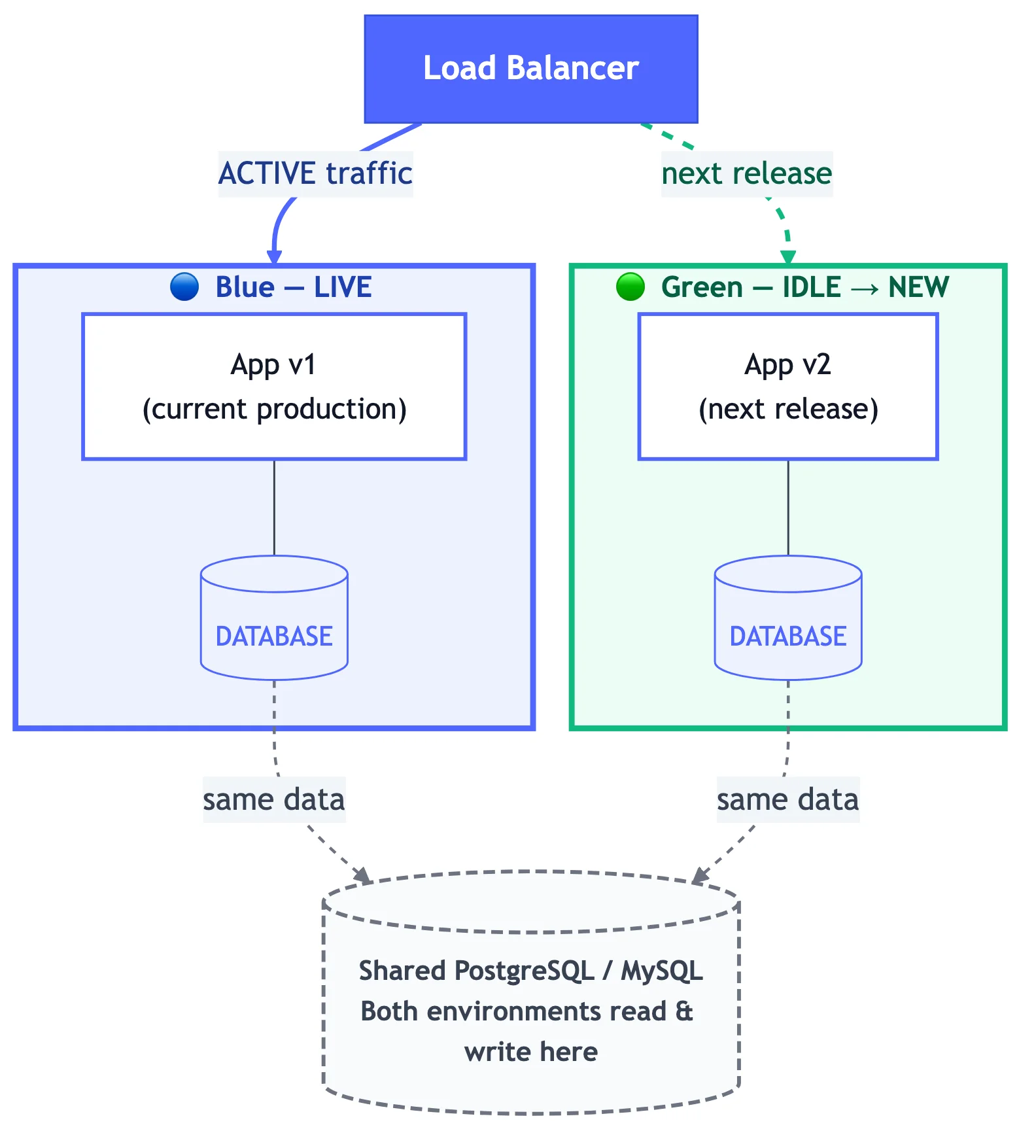
The release sequence:
- Deploy the new version to the idle environment (green).
- Run smoke tests against green while blue handles live traffic.
- Flip the load balancer from blue to green.
- Monitor green. If something breaks, flip back to blue.
- Once green is stable, blue becomes the new idle environment for the next release.
The main advantage is a near-instant, low-risk cutover. The rollback path (flip the load balancer back) is the same operation as the promotion, so the blast radius of a bad deploy is bounded.
Why database blue-green deployments are uniquely hard
Application servers are stateless. You can run version 1 and version 2 side by side, route traffic to one, and discard the other without any coordination problem. Databases don't work that way.
Both environments point at the same data. Unless you provision two separate databases (expensive, with sync complexity), blue and green both read and write the same tables. A schema change that adds a NOT NULL column to orders will break the blue application the moment it tries to insert a row without that column.
Schema changes can't be rolled back by flipping a switch. If green's schema has a column that blue doesn't know about, blue writes will fail. If you drop a column green was using, green breaks. The load balancer flip is reversible; the schema migration usually isn't.
There's a window when both versions run simultaneously. During cutover, in-flight requests from blue are still being processed. You can't guarantee a clean break between old and new code. Any schema change that is incompatible with the old code will cause errors during that window.
Data written after cutover can't go back. If you flip to green and green writes data in a new format, then flip back to blue, blue may not understand that data. You've now corrupted your dataset.
These aren't problems you can solve at the infrastructure layer. They require a disciplined approach to schema changes.
Making schemas backward-compatible: the expand/contract pattern
The expand/contract pattern (sometimes called parallel change) is the standard way to make schema migrations safe for blue-green and rolling deployments. The principle: a schema change is split into phases, each of which is compatible with both the old and new application code.
Phase 1: Expand
Add the new structure without removing anything old. The database now supports both versions of the app.
Example: renaming a column user_name to username
-- Phase 1: Add the new column. Both old (user_name) and new (username) columns exist.
ALTER TABLE users ADD COLUMN username VARCHAR(255);

-- Backfill new column from old data
UPDATE users SET username = user_name WHERE username IS NULL;
At this point: the old app reads and writes user_name, the new app reads and writes username. Both work.
Phase 2: Deploy new application code
Deploy the new application version (which uses username) to the idle environment. Flip traffic to it. Both the expand-phase schema and the new app code are live.
Monitor. If something breaks, flip back. The old column is still there, old code still works.
Phase 3: Contract
After the new code has been running cleanly for an acceptable monitoring period (hours, days, depending on risk tolerance), remove the old structure.
-- Phase 3: Remove the old column now that no running code references it
ALTER TABLE users DROP COLUMN user_name;
This cleanup step is safe because no deployed code references user_name anymore.
Rules for expand/contract
The pattern only works if every schema change follows these rules:
| Change | Safe to deploy directly? | Expand/contract needed? |
|---|---|---|
| Add nullable column | Yes | No |
| Add NOT NULL column with default | Yes (with care) | Recommended for large tables |
| Rename column | No | Yes |
| Drop column | No | Yes (contract phase only) |
| Add index (CONCURRENTLY) | Yes | No |
| Change column type | No | Yes |
| Add foreign key constraint | Caution | Yes, if old code may violate it |
The key test: can both the current version and the new version of the application code run correctly against this schema, simultaneously?
Step-by-step: database blue-green deployment with Bytebase
Bytebase maps directly to the blue-green pattern through its multi-environment deployment pipeline. Each environment (dev, staging, production-blue, production-green) is a separate target in Bytebase, with its own approval and deployment rules.
Set up environments
In Bytebase, create four environments in order: Dev, Staging, Production-Blue, Production-Green. Each environment maps to a database instance.
Submit a migration
A developer submits the schema change through Bytebase. The change goes through the pipeline: Dev first, then Staging, then the production environments in sequence.
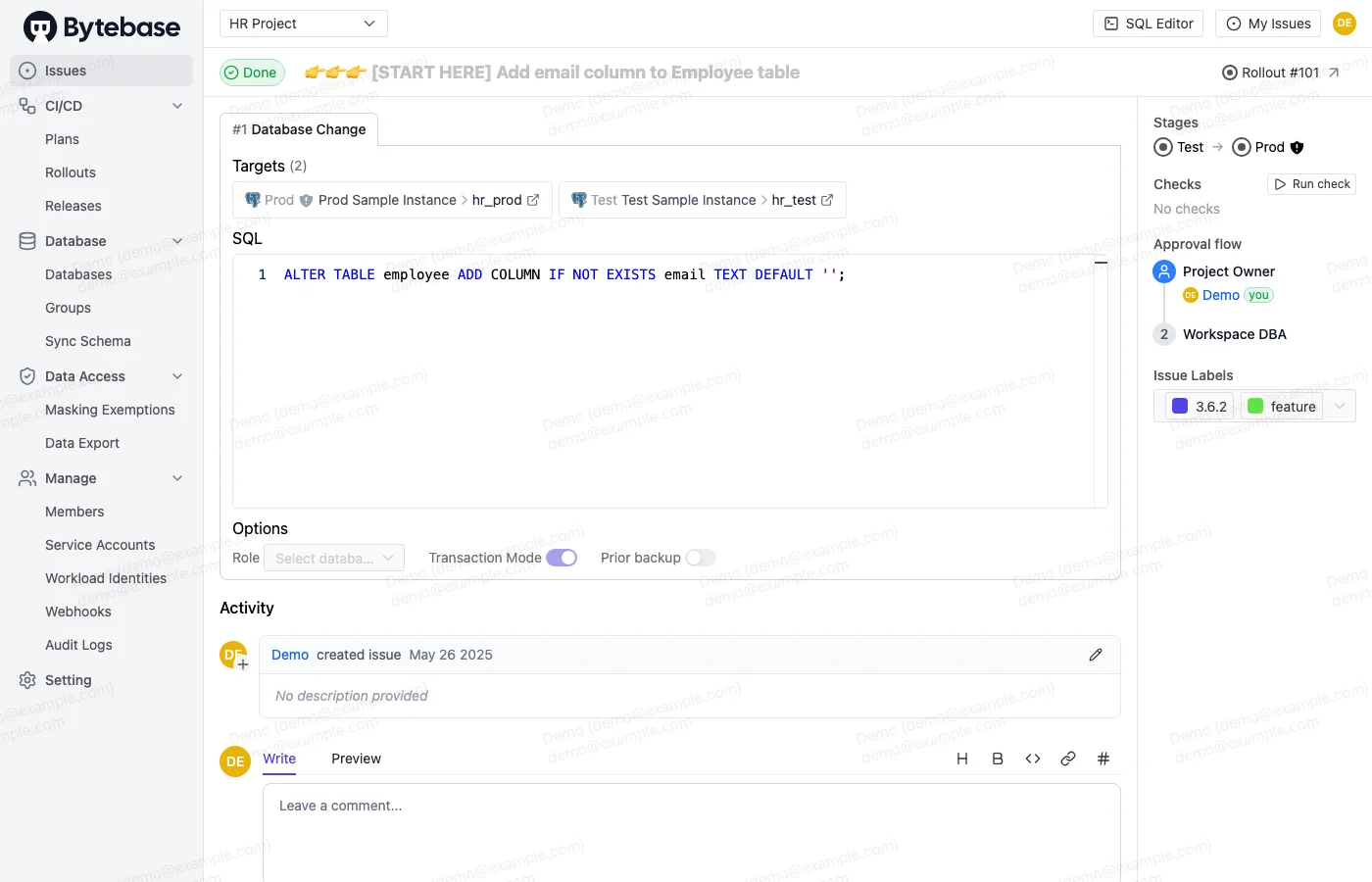
Before the change reaches any environment, Bytebase's SQL review rules run automatically. They check for:
- Missing
WHEREclauses onUPDATEorDELETE NOT NULLcolumns added without defaults- Statements that lock tables
- Naming convention violations
Any violation blocks the issue from advancing until resolved.
Deploy to the idle environment
When the change reaches the production stage, deploy to the idle environment first (say, Production-Green). Production-Blue is still live and receiving traffic.
Bytebase records the exact SQL applied, the timestamp, and who approved it. The change is visible in the change history before it goes anywhere near live traffic.
Flip and monitor
After deploying to Production-Green and validating, flip the load balancer. Production-Green is now live. Production-Blue is idle.
If the new release has a problem, flip back. The schema is in expand phase, so both old and new code still work against it.
Run the contract phase
Once the new code has been stable for your monitoring period, submit the contract migration through Bytebase. This removes the old columns or constraints that the old application code used. Route it through the same pipeline, same review process.
The full database change management workflow in Bytebase means every migration, including the contract phase, has an approval trail. If something goes wrong weeks later, you have an exact record of what changed, when, and who approved it.
Blue-green vs. canary vs. rolling for database changes
These three strategies have different implications for schema compatibility.
| Strategy | Traffic pattern | Schema compatibility requirement |
|---|---|---|
| Blue-green | All-or-nothing cutover | Schema must support both versions simultaneously during cutover window (minutes to hours) |
| Canary | Small percentage routed to new version, gradually increased | Schema must support both versions for the entire canary period (hours to days) |
| Rolling | Instances updated one at a time, old and new code running together | Schema must support both versions for the entire rollout period (minutes to hours per instance) |
Blue-green has the shortest overlap window, which makes it easier to reason about. Canary has the longest, because old and new code run together for days — every schema change in a canary deployment must be backward-compatible for the entire observation window.
All three strategies benefit from expand/contract. Blue-green makes the contract phase simplest because there's a clear point in time when no blue code is running.
Common pitfalls and how to avoid them
Skipping the expand phase and deploying schema changes directly
The most common mistake is treating database migrations like application deployments: ship the new schema to green, flip traffic, done. If the schema removes something the old code needs, blue requests fail during the cutover window. Always expand first.
Long-running migrations holding locks
ALTER TABLE on a large table can hold an exclusive lock for minutes, blocking all reads and writes. In PostgreSQL, use ADD COLUMN with a default set separately (not inline on the ALTER), and build indexes with CREATE INDEX CONCURRENTLY. Test migration duration in staging on a production-sized dataset before promoting.
Forgetting the contract phase
Expand adds columns and keeps old ones. Without the contract phase, the database accumulates dead columns, old tables, and orphaned indexes. Treat the contract migration as a required follow-up, not optional cleanup. Track it explicitly (in Bytebase issues or a ticketing system entry) so it doesn't get dropped.
Not testing rollback
The value of blue-green is the rollback path. If you've never actually tested flipping back, you don't know it works. Include a rollback test in your deployment runbook. Flip to green, run smoke tests, flip back to blue, run smoke tests again. Validate the path before you need it in an incident.
Schema drift between environments
If dev, staging, and production-blue have drifted from each other, a migration that passes dev may fail in production. Database schema drift is a silent killer in deployment pipelines. Bytebase's drift detection checks each environment against the expected schema state and flags discrepancies before a migration runs.
Over-engineering the deployment infrastructure
Blue-green at the database layer doesn't require two physical database clusters. Most teams implement it as two logical environment slots in their deployment pipeline, routing to the same underlying database instance with schema changes managed carefully. Physical cluster duplication is only necessary if you need data isolation between environments, which is rare.
Blue-green deployment reduces release risk at the application tier to a load balancer flip. The database tier requires more work: expand/contract migrations, backward-compatible schema changes, and a disciplined contract phase. The tooling (Bytebase for migration management, load balancer configuration for traffic routing) handles the mechanics. The discipline is in the schema design.
For a deeper look at the multi-environment deployment workflow in Bytebase, see database multi-environment deployments. For the CI/CD integration that feeds schema changes into this pipeline, see how to build a CI/CD pipeline for database schema migration.